HOME — JOURNAL — LINE BLOG
TIPS 2026.10.15 ・ Website ・ LINE

What if you could update your blog just by sending a LINE message?

You know blogging is good for SEO. But getting from writing to actually posting feels like a big hurdle, so it never quite becomes a habit. With that problem in mind, I built a system that lets you update your blog just by sending a message on LINE. It is a service for clients who have their website built by Tenth Of October.

Update your blog just by sending a LINE message. Tenth Of October
LINE Blog Web SEO Rich Menu
01 ・ PROBLEM

You know a blog helps. You just can't keep it going.

Updating your blog makes it easier for people to find you in search, and helps them get to know your business. Most of us know that, yet when it is time to actually write, a lot of people freeze.

01 Opening the laptop is a chore

Log in to the dashboard, create a new post, and so on. The set-up alone uses up your time and your energy.

02 Preparing photos is hard work

Resizing them, working out how to lay them out. I often hear that adding photos is the biggest hurdle of all.

03 Worried about breaking the layout

You worry that one wrong click might mess up the design of the site you invested in.

04 No block of free time

Between the business and the kids, every day is full. Finding time to sit down and work on it is tough.

02 ・ SOLUTION

Send it on LINE, and your blog is updated.

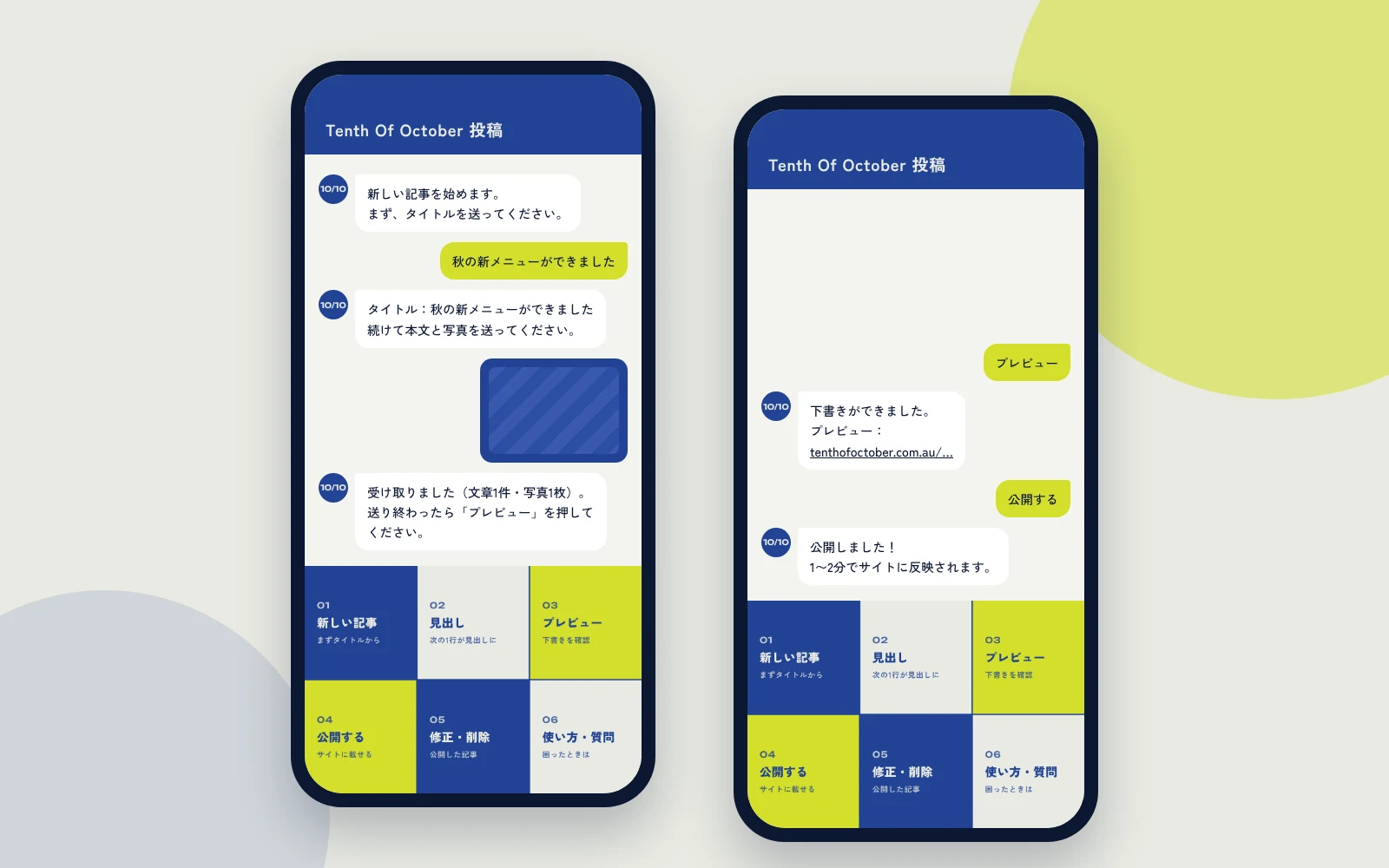
When Tenth Of October builds your website, we can set it up so you update your blog from LINE. Just follow the prompts in the LINE chat and send a title, your text and your photos. They go straight onto the blog on your site.

Mock-up of updating a blog from a LINE chat
STEP 1 Send a title

Tap "New post" in the menu and send your title.

STEP 2 Send your text and photos

Send your text and photos just like any other LINE message. You can add headings too.

STEP 3 Check the preview

See the finished post exactly as it will look on the real page.

STEP 4 Publish

Tap "Publish" and it appears on your site's blog, in the same look and feel as the rest of your site.

If you want to change something after publishing, you can edit or delete it from LINE as well. And if you are unsure how to use it, just ask in the LINE chat. Anything it can't answer comes straight to me.

03 ・ FOR YOU

Who it's perfect for.

MOM Busy mums

Post quickly from your phone once the kids are in bed, or whenever you have a spare moment.

WRITER People who enjoy writing

For people who love to write but find the posting part gets in the way.

SHOP Shop and café owners

Share new menu items and news the moment you think of them.

SEO Anyone who wants to be found in search

The more posts you have, the more ways people can find you through search.

04 ・ DESIGN

I can design your LINE menu, too.

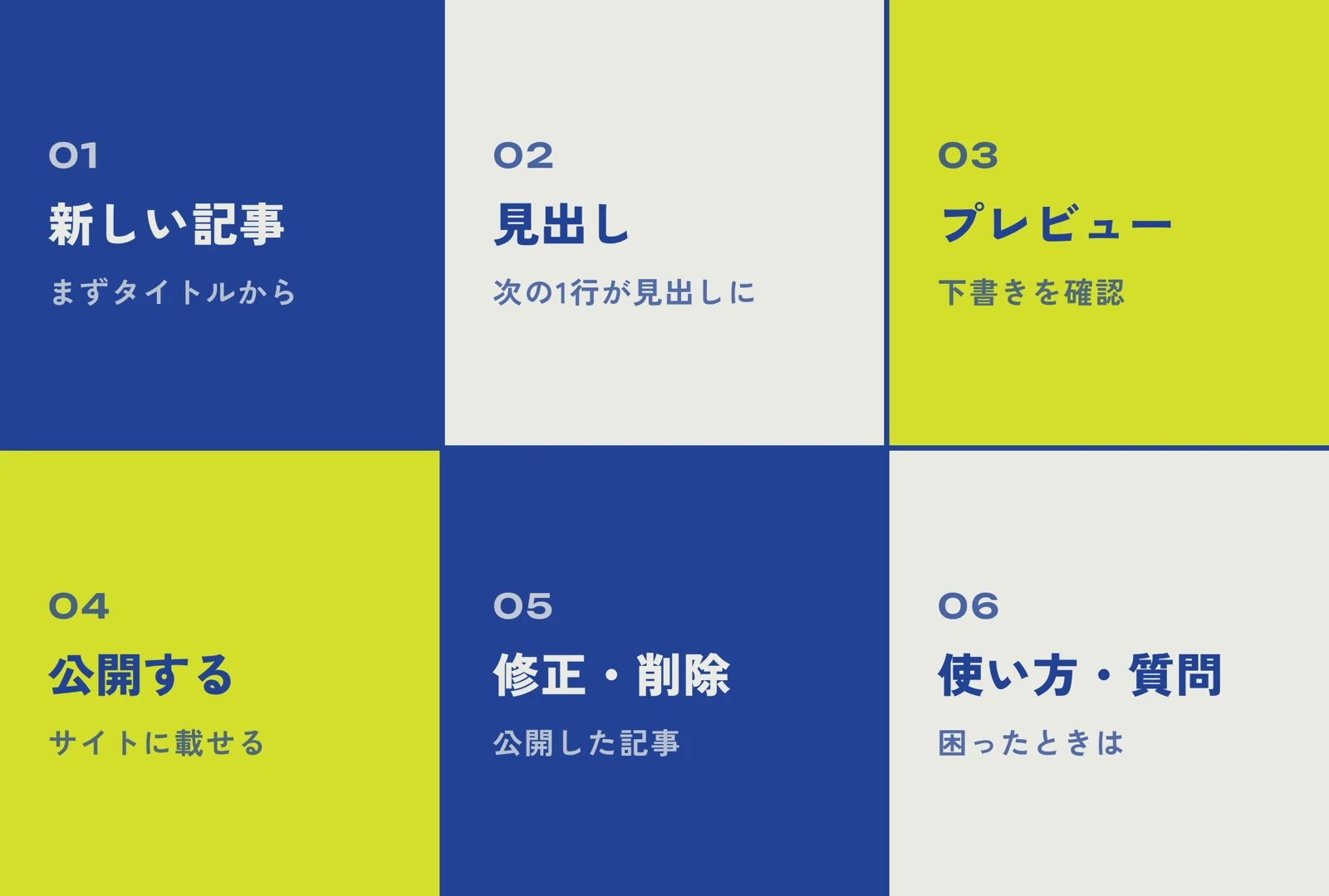
The buttons that sit at the bottom of a LINE chat (called a rich menu) are design work too. For this blog-posting LINE account, I designed six buttons to match Tenth Of October's colours and typefaces.

LINE rich menu designed in Tenth Of October's colours and typefaces

For your business's LINE Official Account, I can design the buttons your customers use most, such as bookings, menu, directions and coupons, to suit the feel of your shop. If you find yourself wondering "can I really ask a designer for this?", please feel free to get in touch.

05 ・ PLAN

A service for retainer clients.

Updating your blog via LINE is a service for clients who have their website built by Tenth Of October and sign up to a monthly retainer. There are no extra fees beyond the monthly management fee, and no limit on the number of posts.

You can find what's included in a website build, along with a rough guide to pricing, on the Services page. I also share other problems design can solve in this article.

06 ・ FAQ

Frequently asked questions

Q. Can I update my blog using only my phone?

Yes. You just send a title, text and photos in a LINE chat, so you don't need a computer.

Q. Can I check how it looks before it goes live?

Yes. Tap "Preview" and you will see it exactly as it will look on the real page. Nothing appears on your site until you tap "Publish".

Q. What if I notice a mistake after publishing?

Use "Edit / Delete" in the LINE menu to fix the text or delete the post. You will get a confirmation message before anything is deleted.

Q. Can I use this with a site I built myself, or one built by another company?

This system is a service for websites built by Tenth Of October. We set your site up so it can be updated from LINE when we build it.

Q. Are there any extra fees?

This service is for clients who have their website built by Tenth Of October and are on a monthly retainer. There are no extra fees beyond the monthly management fee.

KEEP READING A real post sent from LINE, plus tips for sharing your shop's news.
FREE CONSULTATION Want a website you can update from your phone?

Tell us about your business, in English or Japanese. A link or a few photos is a fine place to start. No pressure.

Get in touch →
NEXT Can I really ask a designer for that?

Nine problems design can solve

Read →

Send me an email or DM about your business and ideas or for fun collaboration.

フォームやメール、LINEからお気軽にご相談ください。

オーストラリアで活動されている様々な分野の方からのメッセージやコラボレーションの企画もウェルカムです!